Pick up the prescription
Attach the reminder to the pharmacy. The second you get there, Notify nudges you — not at 9 AM while you’re stuck in a meeting.
Notify brings the right information to you exactly when it matters — so you can act, not react.
Reminders that fire when you arrive, when you leave, or when the time is right — shared with the people who matter.
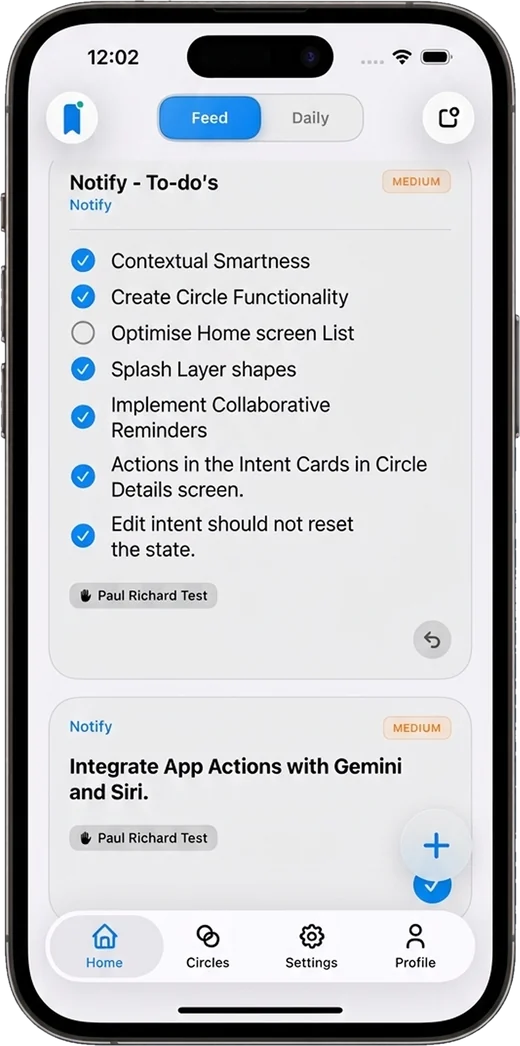
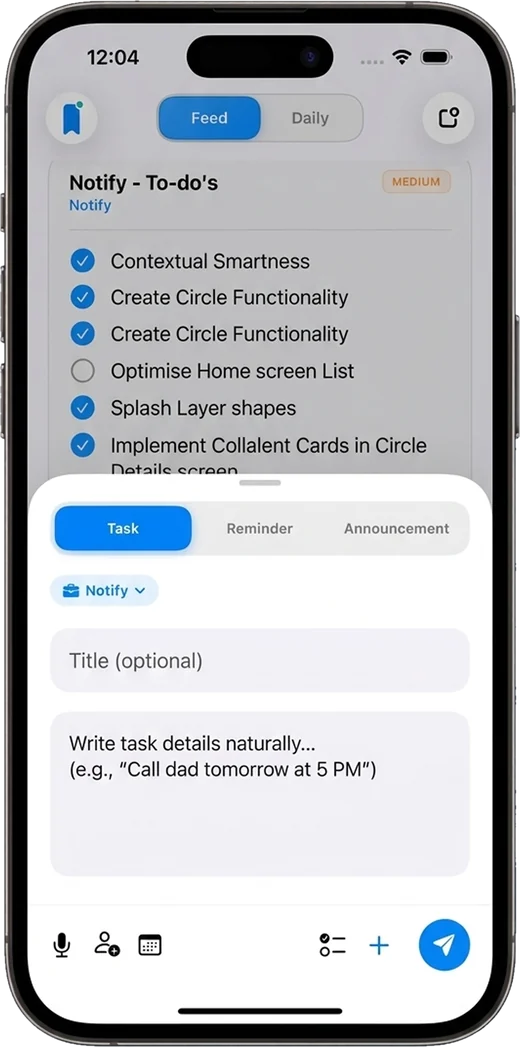
Most apps expect you to remember everything — check lists, open apps, revisit plans.
Notify flips that.
It watches context, not just time.
Where you are. What you’re doing. What matters right now.
And then — only then — it nudges you.
No noise. No overload. Just clarity, at the perfect moment.
The problem isn’t productivity.
It’s context.
Notify connects your tasks, people, and moments — and turns them into timely, meaningful actions.
"What should I do next?"
"This is the right moment to do it."
Real life doesn’t run on a to-do list you remember to open. Here’s what Notify does for you instead.
Attach the reminder to the pharmacy. The second you get there, Notify nudges you — not at 9 AM while you’re stuck in a meeting.
Get nudged as you walk out of the office or the house, while it’s still easy to turn around and grab it.
Pick a date and time in a couple of taps, or dictate it out loud. One reminder, at exactly the right minute.
Post it to the family Circle. Anyone can claim it, and everyone can see the moment it’s done. No more “did you get milk?” texts.
Post “Delay from office” as an announcement and everyone in the Circle is notified instantly, without a dozen individual messages.
Mark it urgent and it breaks through with its own sound. Everything else stays quiet, so the urgent things actually feel urgent.
Capture it once. Tell Notify when it matters. Then let go of it.
Type it, dictate it, or ask Siri. Add a checklist, a photo, a voice note, or a file — whatever will make the task make sense later. Choose a Task, a Reminder, or an Announcement from one quick-add sheet.
Decide when Notify should speak up: at a specific time, when you arrive somewhere, when you leave, or both. Set a priority so the important things cut through, and share it with a Circle if other people are involved.
Notify stays silent until the moment is right. Then it taps you on the lock screen with exactly what you need — and everyone in your Circle sees when it’s done.
A closer look at the features you can use from the very first day — each one built to keep you calm, on time, and in sync.
Getting a thought out of your head should take seconds, not a form.
Tie any task or reminder to a place. Notify uses your phone’s built-in geofencing, so it can nudge you when you arrive or leave — even when the app is closed.
Background alerts need “Always” location access. It’s optional, explained clearly, and you can change it any time.

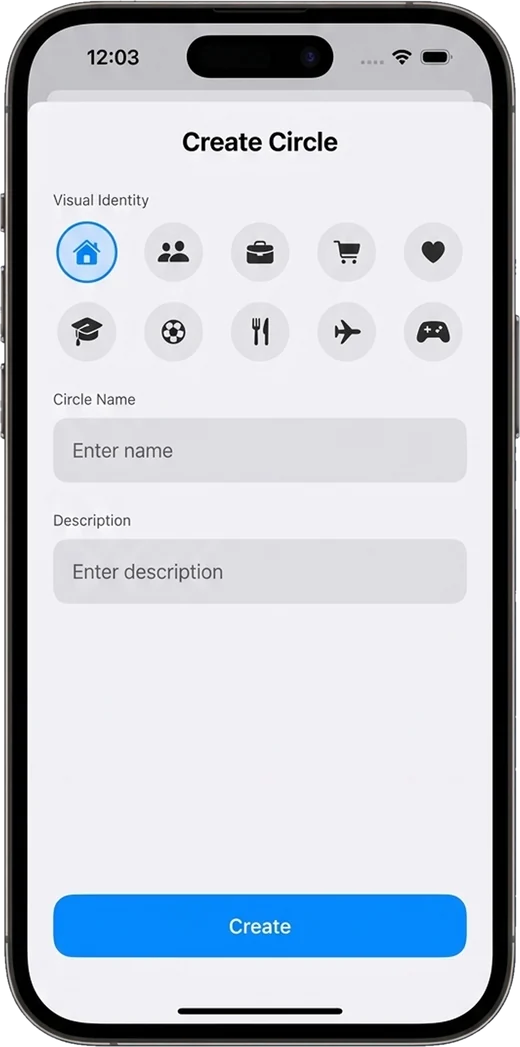
Create a Circle for family, work, roommates, a trip — anything. Everyone inside shares one clean feed of what needs doing.
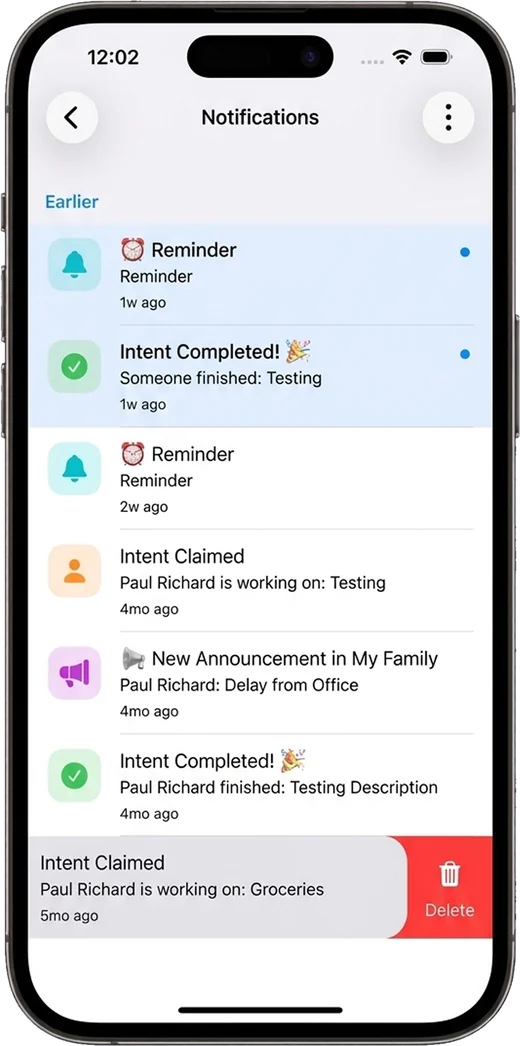
Claimed, completed, announced — Notify keeps a running feed so you never have to ask, “Did anyone do that?”
Set a priority and Notify adjusts its tone. Urgent things get through. Everything else stays out of your way.
Capture in the middle of a busy day without ever opening the app.
Add tasks, set reminders, post announcements, or hear what’s on your list, hands-free on iPhone.
One tap from your home screen to add a task, set a reminder, make an announcement, or open your Circles. Available on iOS and Android.
Native apps for iPhone and iPad, with a roomy split-view layout on the bigger screen and Sign in with Apple.
A fully native Android app, with high-priority alerts, exact-time reminders, and a home-screen widget of its own.
Notify isn’t one clever trick. It’s a hundred small decisions made so you don’t have to.
Break a task into steps. Everyone sees who ticked each one off.
Record a voice note or dictate a task when your hands are full.
Attach the shelf photo, the PDF, the voice memo. Context travels with the task.
High, Medium, or Low, each with its own tone of voice.
Save Home, Work, or the gym once, with your own emoji, and reuse them forever.
Add people with a code, a QR scan, or a shared link. Newcomers land on the app store if they need it.
Broadcast an update to a whole Circle in one post.
Hand a task to a person, or let anyone in the Circle pick it up.
See what was claimed, completed and posted, filtered by Circle.
Organise tasks and reminders with labels you can filter on.
Change a due time and the alert moves with it. Finish early and it’s cancelled.
Review every permission Notify uses on one screen, feature by feature.
Two big capabilities are on the way. They’re the heart of where Notify is headed, and beta testers will see them first.
Not just when, but why now.
Notify learns the rhythm of your day — where you usually are and when you usually do things — and suggests the right time and place as you create a task. It’s designed to run on your device wherever possible, so your routines stay yours.
Planned as part of Notify Plus.
Coordination without constant messaging.
Know where everything stands across every Circle without asking. It should feel less like “managing people” and more like being naturally in sync.
Notify is free to start and genuinely useful on its own. Notify Plus is for bigger families, busier teams, and people who want more.
Everything you need to get started
Unlimited circles, bigger groups, more places
Notify Plus is an optional subscription. Pricing is shown in the app before you subscribe, and it renews automatically until cancelled. See the Terms of Service for details.
Whether it’s just you, the people you live with, or the people you work with, Notify fits the way you already live.
Your second brain, without the overload.
Never forget the small things that quietly matter — and stop carrying them in your head.
Coordination without chaos.
One Circle for the household: groceries, school runs, appointments, and the “who’s picking up?” of it all.
Less tracking. More momentum.
Lightweight coordination for small teams, clubs and projects that don’t need a heavyweight tool.
Circles for anything:
Notify is built on the idea of calm technology. It doesn’t demand attention; it earns it, only when necessary. Because the best tool is the one you barely notice, yet rely on every day.
If it’s not helpful right now, it stays silent. No spam, no anxiety loops, and low-priority reminders don’t even make a sound.
Location, notifications, microphone, camera, photos — every permission is optional, explained in plain words, and reviewable on a single screen.
Life is shared. Circles make coordination feel like being naturally in sync with the people you care about, not like managing them.
Read how we handle your information in our Privacy Policy.
Everything you might want to know before you join. Still curious? Ask us anything.
Notify is a reminder and shared-task app that speaks up at the right moment: when a time arrives, when you get to (or leave) a place, or when someone in your Circle needs a hand. Use it on your own, or with family, friends and teams.
Yes, Notify is free to start. The free plan includes tasks, reminders, announcements and time and place triggers, with one Circle you own (up to three members) and one saved place. Notify Plus lifts those limits and adds priority full-screen alerts.
iPhone and iPad, and Android phones. Join the iOS beta through TestFlight, or request access to Android closed testing from the sign-up section below.
Attach a place to any task or reminder and choose On arrival, On leaving, or Both. Notify registers a geofence with your phone’s operating system, which watches for you crossing it, so the alert can fire even when the app is closed. For that, allow location access “Always” — you can change it any time in your device settings.
Geofencing is handled by the low-power location systems built into iOS and Android, rather than Notify constantly polling GPS, so it’s designed to be light on battery.
A Circle is a shared space for a group — family, work, a trip. You invite people with a code, a QR scan or a link. They’ll need the Notify app to join; the invite link takes them straight to the app store if they don’t have it yet.
Photos, videos, documents and audio files, plus voice notes, checklists and labels. It all stays with the task so context travels with it.
On iPhone you can say things like “Add a task in Notify” or “What are my tasks in Notify?”, and add the Notify Actions widget for one-tap shortcuts to create tasks, reminders and announcements. Android has a home-screen widget too.
Two big things: Contextual Intelligence (suggestions and summaries based on your routines) and Shared Awareness (a glanceable view of what’s claimed, done and pending across your Circles). See the roadmap for the bigger picture.
You decide what Notify can access — location, notifications, microphone, camera and photos — feature by feature, and you can review each one on the app’s Permissions screen. Circles are only visible to their members. Our Privacy Policy has the full details, and you can request account deletion from the Contact page.
On iOS, tap “Join TestFlight” below. On Android, request access with your name and email and we’ll add you to closed testing. Spots are limited, and we’d love your feedback.
The beta is open on iOS and Android.
Join today and help shape what Notify becomes.
Spots are limited. No spam, ever.